Posts

Showing posts with the label php

Lowering the boundary to Code Contribution
Image
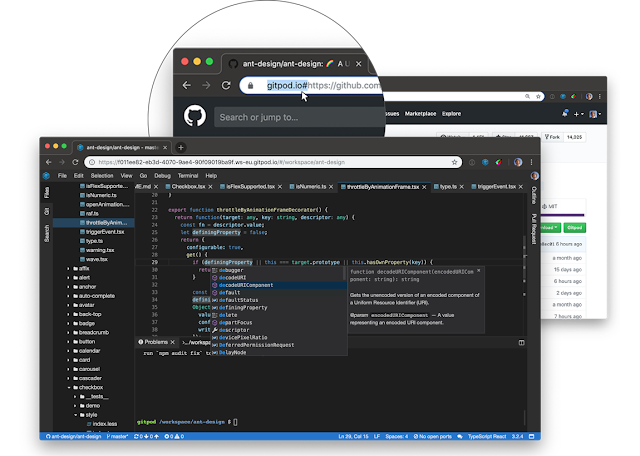
Thinking of using Gitpod as your Cloud IDE? Read this first... I'm preparing for a hands-on coding workshop and wanted my participants to get coding as fast as they can. I decided to leverage Gitpod as a Cloud IDE. Here’s how I set it up including challenges I encountered and their remedies. šŸ§‘‍šŸ’» Gitpod Gitpod is a tool I've been using to set up an isolated development (dev) environment for troubleshooting. I have relied on ready made repositories from the open source community, but now was a chance to dive deeper. 🐳 Docker Compose Ready My repository uses docker and docker compose. Docker is great for providing consistent dev environments across multiple developers. It's also great for isolating your project from other projects on your machine so you can mix and match your tools. I dived straight in and got my repository loaded on Gitpod. Gitpods default image  supports docker, docker compose, php, and node out of the box. So it was as simple as running ‘docker compose u...

Government of Tonga’s first mobile app nears completion

Image
  Caption: Workshop participants Last week I was in Tonga to facilitate a training workshop for the Tonga Meteorological Services (TMS) and its partners. The workshop is part of finalising the Tonga Joint Early Warning and Response mobile app (app name to be finalised). The TMS lead initiative will help address challenges in communications on the ground and sharing of data with partners in times of natural disasters. Furthermore, the app provides real-time weather warnings using push notifications to mobile devices. Unlike traditional “weather” apps, TMS envisioned a “two-way” app that not only provides weather forecasts but enables the public to report weather and disaster related events to them. It will become the first mobile app for the Government of Tonga and will be available in Tongan and English languages on Android and iOS devices. SPREP provides ICT expertise to assist TMS Caption: Mr. Ainsof So'o reviewing the mobile app One of the Secretariat of the Pacific Regional Env...

Tips for improving Drupal security

Image
  I had a chance to check out the Talking Drupal: Drupal security podcast. These were my key takeaways. Top 3 tips Its stuff we already know about but don't do. Lets educate and remind ourselves and others. Do not write down passwords (especially on sticky notes). Use a Password Manager e.g. LastPass , Bitwarden , Passbolt Patch your modules. Security patches are released every 3rd Tuesday of the month by the Drupal Security team . Sign up to security announcements. You can use RSS feeds to bring updates to your slack, teams, etc. There is also a Discord site . Use tools that make your code better. e.g. CI to make it more readable (coding styles, comments). Code reviews. Write the least amount of code as possible. No code is best ie only using Core and Contrib modules. (IMO, as a developer this is impossible šŸ˜‚)    Contrib modules to help improve Drupal security Cloudsec - Uses the Crowdsec service to block malicious traffic Username enumeration prevention - ...

Deploying Laravel Jetstream Inertia based app on LEMP stack and Ubuntu 22

Image
Today I deployed a Laravel 10 Jetstream Inertia based app on LEMP stack and Ubuntu 22. Here is the gist of what I went through. Deploy server with Ubuntu 22 I deployed a private Github repo so I needed to generate a public ssh key for your user . ssh-keygen -t ed25519-sk -C "YOUR_EMAIL" . Next add that key to your Github repo deploy tokens. Clone repo to /var/www/[your-site] git clone [myrepo] . Install Basic Laravel with LEMP stack and Composer with this tutorial . Also handy to refer to Laravel's recommended Nginx config Used strong (level 2) password for mysql setup which required logging in using sudo mysql and setting the root password before continuing with the usual sudo mysql_secure_installation process. Also needed additional php plugins for my app php-gd, php-zip My public folder was not in the root so I have to set it to ./laravel/public for my vhost file. In order to mock my production domain (which does not have DNS records yet). I edited my local...

How to redirect alias or old domains to your primary domain

Image
Have you ever been in one of these situations? Migrated from one domain to another (and preserve your search rankings) Created alternative domains but have one primary domain (which also helps with your search rankings) You can use the following PHP script:   You want to replace  oldsite.com and  alternative-spelling.com with your alternative domains (delete one of them if you only have one). Then replace  primary-domain.com with your primary domain. The script is used in a wodby deployment environment, but the most important part is: # php snippet header('HTTP/1.0 301 Moved Permanently'); header('Location: https://primary-domain.com');